Writing
GBA Assembly — 4. Pixels, colors and rectangles
Learn how coordinates become VRAM addresses and how five-bit RGB colors form a rectangle in Mode 3.
In the first ROM, we wrote a pixel's color directly. Now we will draw a green rectangle on a black screen. There is still no player, enemy, or win condition: the only problem is converting an area of the screen into memory writes.
Use the complete retangulo.s file, also included in the series package. It uses the same gba.ld and rom.py as before. The blocks below highlight the routine we are studying; do not replace the entire file with one fragment.
Your route through this chapter
Before starting: build and open the red-screen ROM from chapter 3. Keep the working source.
- Save the complete
retangulo.sbesidegba.ldandrom.py. Open it in your text editor; leave the previous.sfile separate. - Read the coordinate and color examples below, then find
fill_rectand its call in the complete file. The call supplies the values; the routine does the drawing. - Run this chapter's four build commands in the same terminal folder, then open
retangulo.gbain mGBA. - After the original result works, change only the rectangle call's width from 32 to 64. Keep the height at 32, save, and repeat all four commands. Leave the separate full-screen clearing call unchanged.
Checkpoint: first you see a green 32-by-32 square on black; after the edit it is 64 pixels wide and 32 high. If the whole background changes, check which call you edited. Restore the original width before continuing.
The screen as a sequence of numbers
In Mode 3, an image has 240 columns and 160 rows. Each pixel occupies a halfword, or two bytes. Memory stores one row after another:
pixel (0,0)       -> 0x06000000
pixel (1,0)       -> 0x06000002
pixel (239,0)     -> 0x060001DE
pixel (0,1)       -> 0x060001E0
A row occupies 240 × 2 = 480 bytes. Moving right means advancing two bytes. Moving to the same column in the next row means advancing 480 bytes. The general formula is:
address(x,y) = 0x06000000 + 2 × (y × 240 + x)
This relationship depends on the video mode. With tiles and sprites, writing to the same region means something different. The circuitry interprets data according to the configuration selected in DISPCNT.
Fitting three intensities into two bytes
Each color component has five bits and ranges from 0 to 31. Bits 0 through 4 hold red, 5 through 9 hold green, and 10 through 14 hold blue. Bit 15 is not a transparency channel in this mode.
color = red | (green << 5) | (blue << 10)
| Color | Red | Green | Blue | Value |
|---|---|---|---|---|
| Black | 0 | 0 | 0 | 0x0000 |
| Red | 31 | 0 | 0 | 0x001F |
| Green | 0 | 31 | 0 | 0x03E0 |
| Blue | 0 | 0 | 31 | 0x7C00 |
| White | 31 | 31 | 31 | 0x7FFF |
Do not copy a CSS color such as #FF0000 straight into VRAM: its format and bit count are different. This is not specific to assembly. Any language controlling this mode must respect its format.
A drawing function of our own
Consult BL and BX for calls and returns, and PUSH and POP for the values the routine preserves.
We want to pass a position, size, and color to a routine. Our convention is:
| Register | Parameter |
|---|---|
r0, r1 | X and Y of the upper-left corner |
r2, r3 | Width and height in pixels |
r4 | 16-bit color |
This is an agreement between our routines, not a promise of compatibility with any C function. We call with bl fill_rect. bl saves a return address in lr, and bx lr returns to the caller.
Here is the complete drawing routine:
<!-- source: en/retangulo.s#pixels -->@ r0=x, r1=y, r2=width, r3=height, r4=color.
@ Requires positive width/height and a rectangle entirely inside the screen.
fill_rect:
push {r5-r8, lr}
mov r5, #240
mul r6, r1, r5
add r6, r6, r0
ldr r5, =VRAM
add r5, r5, r6, lsl #1
rsb r7, r2, #240
mov r7, r7, lsl #1
mov r6, r3
row:
mov r8, r2
pixel:
strh r4, [r5], #2
subs r8, r8, #1
bne pixel
add r5, r5, r7
subs r6, r6, #1
bne row
pop {r5-r8, lr}
bx lr
push {r5-r8, lr} saves the values the routine wants to preserve on the stack; pop restores them at the end. Startup configured sp. Since the stack occupies RAM, saving and restoring are also memory operations.
mul r6, r1, r5 calculates Y × 240; we add X and multiply by two using lsl #1. Adding that to the VRAM base produces the first pixel's address.
Why two loops?
The routine combines MUL, ADD, SUB, and RSB, shifts, and post-indexed addressing.
A 32-by-32 rectangle has 32 pixels per row and 32 rows. The pixel loop writes one row; the row loop repeats for the remaining rows.
After writing 32 pixels, the pointer has advanced 64 bytes. Reaching the beginning of the rectangle's next row requires another (240 - 32) × 2 = 416 bytes. We keep that distance in r7.
Without that adjustment, the next pixels would be written beside the previous ones as a long strip. The CPU has no built-in concept of a rectangle: we implement it with a sequence of addresses and two counters.
The routine requires positive width and height and an area entirely inside the screen. It does not automatically clip invalid coordinates. Our examples obey 0 ≤ X, 0 ≤ Y, X + width ≤ 240, and Y + height ≤ 160. A width of zero would also be an error because the loop writes before decreasing the counter.
Calling the routine
In the complete file, startup clears the screen with a black 240-by-160 rectangle and then prepares this call:
mov r0, #104
mov r1, #64
mov r2, #32
mov r3, #32
ldr r4, =0x03e0
bl fill_rect
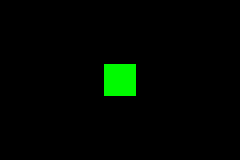
The rectangle occupies X from 104 to 135 and Y from 64 to 95. Its center matches the image's center. Video remains in forced blank during preparation and is enabled afterward. Since the image is static, execution can stay in the final loop.
Build the example with:
arm-none-eabi-as -mcpu=arm7tdmi -g -o retangulo.o retangulo.s
arm-none-eabi-ld -T gba.ld -o retangulo.elf retangulo.o
arm-none-eabi-objcopy -O binary retangulo.elf retangulo.gba
python3 rom.py retangulo.gba
Open retangulo.gba in mGBA. You should see a green 32-by-32 square on a black background.
From a simple shape to a game scene
A road can be a long rectangle. A health bar can be a rectangle whose width depends on a variable. A board can convert columns and rows to X and Y before drawing. Our program gives these elements meaning; to the hardware, they remain colors in VRAM.
We will keep using the simple square in the following chapters. It lets us study timing and input without also organizing an entire map.
For an exercise, change only the width to 64. The object should become a horizontal rectangle. Then change its color to blue. Finally, call the routine twice before enabling the screen to draw overlapping rectangles: the last write wins where they overlap. Mode 3 does not maintain an object list that automatically preserves the rectangle underneath.
Tonc's bitmap-mode reference describes image formats and the differences between modes. The connection between color, memory, and video configuration is what we need to take from this chapter.
Previous: your first ROM. Next: making the square blink in sync with the display. Series index.