Writing
GBA Assembly — 1. How the hardware works
Start from scratch: understand the Game Boy Advance CPU, ROM, RAM and memory map before writing your first instructions.
You press a button, a character moves, and the screen changes. In a browser game, a library can hide most of the path between those three things. On the Game Boy Advance, we will see that path: the CPU reads the buttons, calculates a position, writes numbers to video memory, and the video circuitry turns those numbers into an image.
This series assumes you understand variables, conditions, and loops. You do not need to know electronics, assembly, or computer architecture. We will learn each concept through a small example and work up to a mini-game in which you move a square to a target. That foundation prepares you for the main Tower Defense tutorial.
Keep the instruction and syntax reference handy as you read. It collects commands, conditions, and directives in one place. The chapters also link directly to the sections used by each example.
How to follow this course
You only need to recognize a variable, an if condition, and a loop. We introduce the hardware and assembly vocabulary as it appears. You do not need electronics knowledge or previous console development experience.
- Read chapters 1 and 2 with a notebook. Their short code blocks are tracing exercises; you do not need to install or run anything yet.
- In chapter 3, install the tools, prepare three files, and build your first ROM. A ROM here is the game file you open in an emulator, a program that imitates the console on your computer.
- In chapters 4 through 8, open the chapter's complete
.sfile, build it, and check the described result before editing. Each file is an independent program. Short quoted routines explain part of that file; they are not replacement files. - Make one small change, save, rebuild, and compare the result with the prediction. Keep a copy of the last working source so you can undo the change.
- Use chapter 9 to check your understanding before starting Tower Defense. The instruction reference is for looking up a command when you encounter it; you do not need to memorize it first.
The required route ends at each chapter's checkpoint. Extra experiments are optional. If a checkpoint fails, resolve it before adding the next concept: later examples build on the explanation you have just used.
Which Game Boy are we programming?
Our target is the Game Boy Advance, or GBA, the same console used in this site's Tower Defense tutorial. The original Game Boy and Game Boy Color use a different CPU and instruction set. The ARM programs in this course do not run on them. The GBA's ability to play older games does not make their programming environments identical.
The GBA CPU is the ARM7TDMI. We will use its 32-bit ARM instruction set. It also supports Thumb, with smaller instructions, but mixing the two now would add unnecessary complexity. Assembly names a family of languages close to CPU instructions; there is no universal assembly language.
The path a program takes
A CPU executes instructions represented by numbers. One instruction can add two values, another can read a memory address, and another can change the execution position. The text add r1, r1, #1 is a readable way to request one of these operations. A program called an assembler translates that text into the representation the CPU executes.
Our .gba file will be a ROM image: a sequence of bytes arranged like a cartridge's contents. On the console, startup passes through the built-in boot program before entering the cartridge. An emulator can reproduce or partly replace that process. Opening a ROM in an emulator is therefore useful verification, but it does not prove that the ROM works on physical hardware.
Once execution reaches our code, no browser calls an update function for us. We are responsible for preparing the memory we use and writing the loop that keeps the game running.
CPU, ROM, and RAM have different jobs
Think of a recipe, a worktop, and the small notes you keep while cooking. ROM is like the recipe: it contains instructions and data our program consults. RAM is like the worktop: it holds the state that changes during play. CPU registers are like the notes you are using at that moment.
The analogy has limits. Registers are storage locations inside the CPU; RAM occupies other parts of the system. To calculate with a variable in RAM, we normally load it into a register, perform an operation, and store the result back.
| Component | Role in this game | Example |
|---|---|---|
| CPU | Execute instructions | Add one to an enemy's position |
| Cartridge ROM | Keep code and constants | The routine that calculates damage |
| Work RAM | Hold game state | Base health and coin balance |
| Video memory, VRAM | Hold graphics data | Pixel colors in the selected mode |
| Input/output registers | Expose hardware controls | Read buttons or select a video mode |
| Video circuitry | Produce an image from settings and data | Display the board |
The hardware does not know what a tower, a coin, or a victory is. Our program gives those things meaning.
The path from code to screen
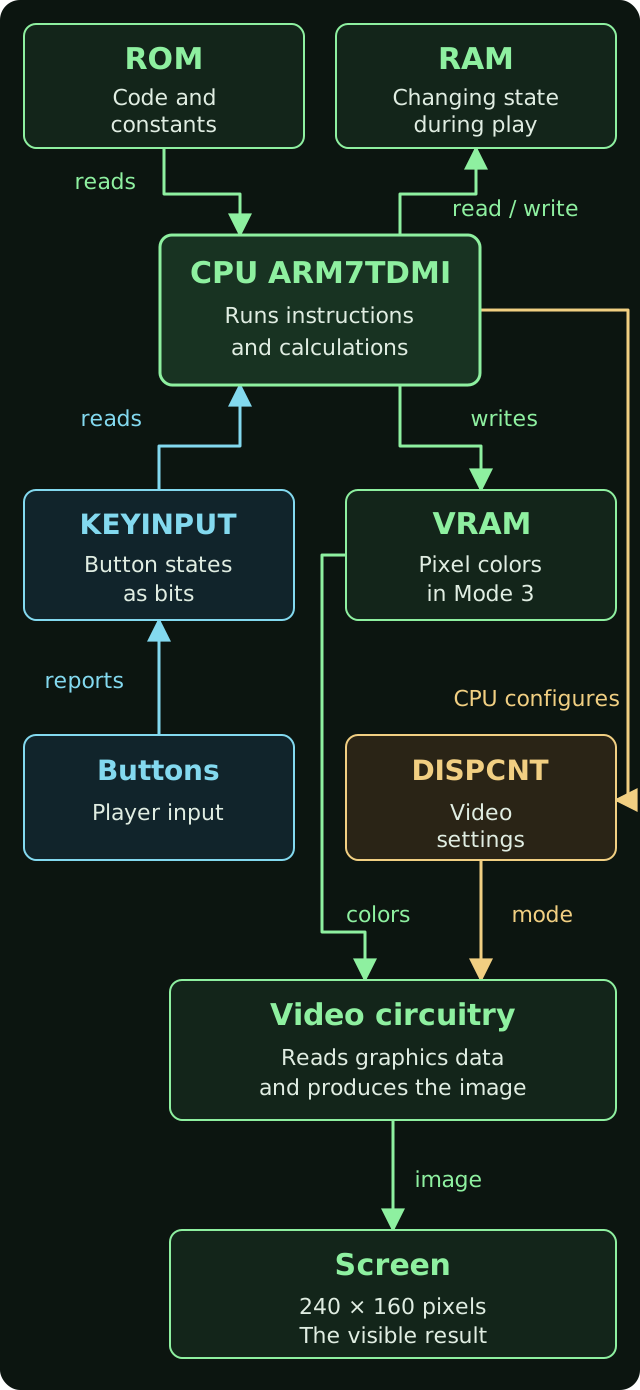
Read the arrows as the data paths used by our examples. The double arrow to RAM means reading and writing: the CPU reads the player's position, calculates a new position, and stores it. ROM supplies instructions and constants; it is not where we save changing game state.
Buttons reach the program through KEYINPUT. To show the result of an action, the CPU writes colors to VRAM. It also chooses how video should interpret that data through DISPCNT. The video circuitry uses the settings and graphics data to produce the screen image.
This is a conceptual map of how we use the hardware, rather than an electrical diagram of the console's wires and buses. Other accesses are possible, and graphics data is organized differently depending on the video mode. Next, we will assign addresses to the components our program accesses.
Addresses connect assembly to hardware
The CPU can access many of these components through addresses. An address identifies a location in the memory map. It does not necessarily identify a RAM cell: some ranges correspond to hardware controls.
| Starting address | Region | How we will use it |
|---|---|---|
0x02000000 | EWRAM, 256 KiB of work RAM | Game variables |
0x03000000 | IWRAM, 32 KiB of internal RAM | Call stack |
0x04000000 | Input/output registers, or I/O | Video and buttons |
0x05000000 | Palette memory | A later graphics improvement |
0x06000000 | VRAM, 96 KiB | Our example's image |
0x07000000 | OAM, graphics object attributes | A later introduction to sprites |
0x08000000 | First cartridge ROM access region | Code and constants |
0x marks a hexadecimal number. We will learn that notation in the next chapter. For now, treat the table's numbers like street addresses: changing the address can mean talking to a different component.
This is only part of the map. Other regions, mirrors, and access restrictions exist. We will not assume that any address can be freely read or written.
Two meanings of register
For the notation in this example, look up CPU registers and LDR, STR, and the difference between an address and its contents.
This distinction prevents a lot of confusion. r0 is a CPU register: it can temporarily hold a number or an address. DISPCNT is a video control register, accessed at 0x04000000: its bits configure the video circuitry.
In this fragment, which is only a reading exercise for now, we prepare a setting:
ldr r0, =0x04000000
ldr r1, =0x0403
strh r1, [r0]
The first line puts the address of DISPCNT in r0. The second puts the desired value in r1. The third writes 16 bits of that value to the address held in r0. The video circuitry interprets those bits as settings. We have configured the hardware by writing to a meaningful address.
At another address, the same strh instruction might write a color or change a variable. The instruction describes the operation; the address determines which part of the system it interacts with.
What we will build, in order
| Chapter | Question we will answer | Experiment or result |
|---|---|---|
| 1. This article | How does a program reach the hardware? | Identify CPU, memory, and I/O |
| 2. Bits, registers, and memory | What does an instruction actually change? | Trace values step by step |
| 3. Tools and your first ROM | How does text become an executable cartridge? | Red screen with a white pixel |
| 4. Pixels and drawing | How do coordinates become VRAM addresses? | Green rectangle on a black background |
| 5. Timing and VBlank | How do we follow the display's timing? | One update per frame |
| 6. Reading the buttons | How does hardware represent a button? | A square changes color when A is pressed |
| 7. Moving a square | How do input, position, and image work together? | A square controlled by the D-pad |
| 8. First mini-game | How do small rules form a game? | Reach a target, win, and restart |
| 9. Debugging and next steps | How do we find out why something failed? | Inspect a ROM and plan improvements |
The first two chapters cover fundamentals. From chapter three onward, we run examples. The support package contains six independent programs: first screen, rectangle, blinking, buttons, movement, and mini-game. Each .s file is complete and uses only the included linker script and header tool. You can write the fragments you study and compare them with the complete file, without depending on hidden functions.
The Tower Defense code comes from Gateblade version v0.3.0 and was developed with AI assistance. The six examples in this series were prepared separately to teach one concept at a time. Testing focuses on emulation; physical GBA hardware has not been tested.
Before moving on
Try to answer these questions: who decides that an enemy lost health? Who keeps that value between updates? Who turns the stored colors into an image?
The answers are, respectively, our code running on the CPU, RAM, and the video circuitry. If you can distinguish those three jobs, you already have the model you need to begin.
For the map and the machine's capabilities, consult Tonc: GBA hardware. Tonc's introduction to ARM assembly will be a companion reference throughout the series.
Next: bits, registers, and memory, starting with the first instructions.